Canada hub

Auto repair shop management software for Canadian shops

Automotive shop management software connects customer intake, vehicle records, appointments, repair work, invoicing and payment status. For a Canadian independent shop, the useful comparison is whether those handoffs fit your team, currency and locations. Use one completed repair and one unfinished job to evaluate Strut, then confirm your setup and integration requirements.

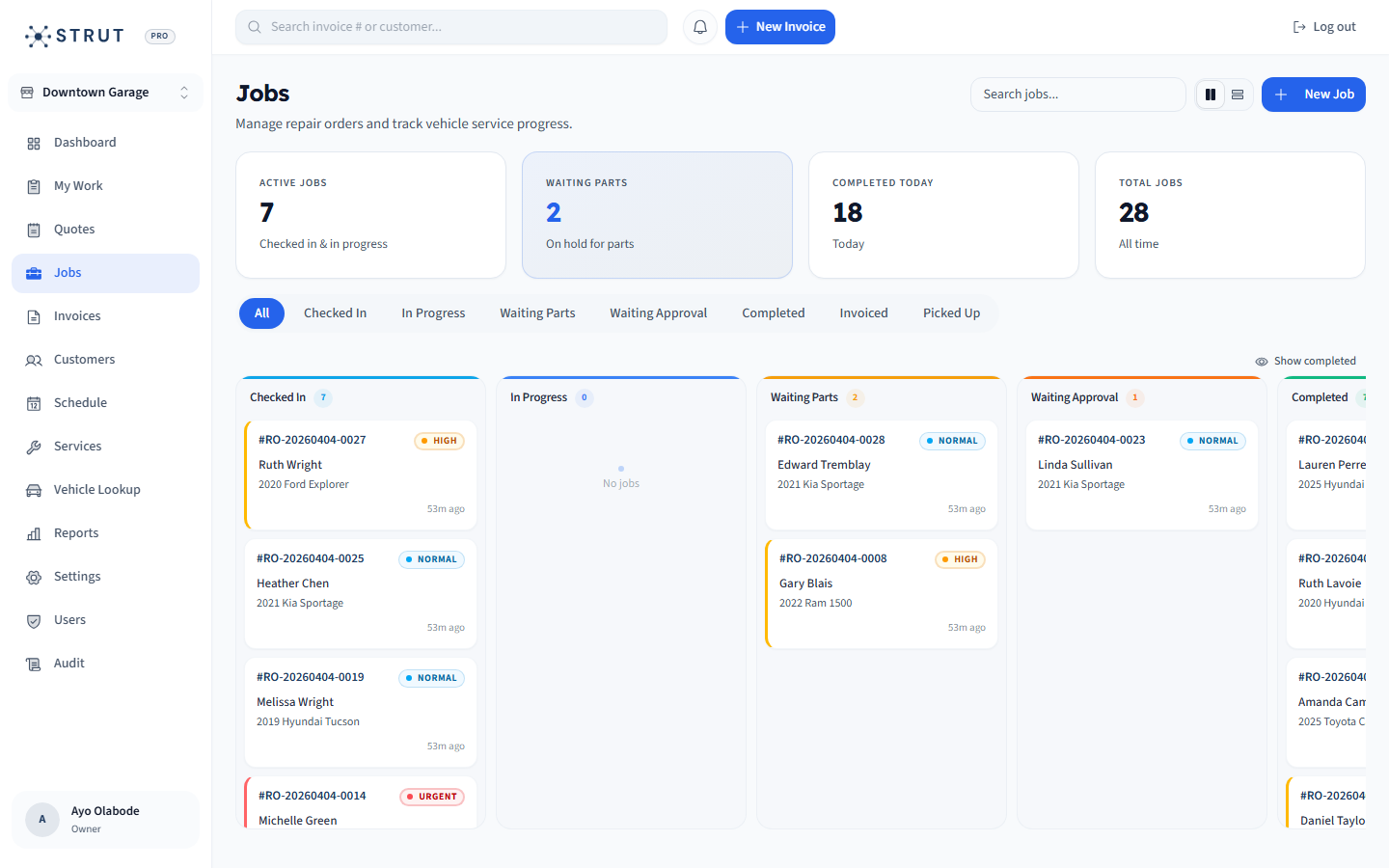
Strut public job board showing repair statuses and vehicle context
The public job-board screen shows how advisors can distinguish active repairs and parts holds. Use a demo to check the handoff from your appointment to the job and invoice.

Workflow evidence

Compare software with two real shop situations

Bring a routine repair and a job waiting on parts. In each demo, start with the customer and vehicle, locate the booking, follow the repair status, then inspect the invoice and payment record. Record what the advisor can complete without entering the same information again. A feature checklist is useful only when your team can demonstrate the full handoff.

  • For the completed repair, find the right vehicle and explain each final charge.
  • For the unfinished job, identify the parts hold, responsible person and next customer update.
  • Keep demonstrated capability separate from a promised future integration.
Use the Canadian shop software evaluation guideSeparate estimates, repair orders and final invoices

CAD and buying terms

Build a Canadian software budget you can compare

Strut publishes its current $49 CAD/month launch offer through the live pricing source. Put the quoted currency, billing period, location terms and included access beside that subscription. Payment processing, required third-party subscriptions, data preparation and staff training belong in separate rows. A low headline price does not resolve a missing accounting connection or an import that excludes the records you need.

  • Compare equivalent monthly or annual commitments in the same currency.
  • Get written terms for your shop count, required integrations and cancellation.
  • Check a sample invoice against your own tax configuration before going live.
Review subscription costs and software dependenciesCompare repair invoicing products and their dependencies

Implementation fit

Choose the first workflow to put into service

Assign one advisor to check a small customer and vehicle sample before importing more. Choose the first location, confirm hours and capacity, and agree how open work and unpaid invoices will be handled during the transition. Test staff access with the roles that will actually use the system. Keep a checked source export and a named owner for problems found after the switch.

  • Single-shop setup: check booking, one repair, one invoice and the next returning visit.
  • Growing group: check each location, its invoice context and staff visibility separately.
  • Prepare a go-live checklist and a fallback process for unresolved import exceptions.
Plan the checks before switching shop systemsReview multi-location shop controlsInspect customer and vehicle history

Buying questions

Fast answers before a demo.

Short answers to the questions shop owners usually ask before they book a walkthrough.

How much does Strut Platform cost?

Strut Platform is $49 CAD/month for the full platform, including booking, scheduling, repair orders, invoices, payments, CRM, reporting, and multi-location controls.

Is Strut built for Canadian auto repair shops?

Yes. Strut is built in Calgary for Canadian repair shops and is priced in Canadian dollars. It is designed around appointment booking, shop capacity, repair orders, invoices, customer records, and payment collection.

What should Canadian repair shops look for in shop management software?

Look for connected booking, repair orders, invoicing, payments, customer and vehicle history, staff visibility, clear pricing, and support for multi-location growth if your shop plans to expand.

How should a Canadian shop compare automotive management software?

Run the same completed repair and unfinished job in each demo. Check customer and vehicle lookup, appointment context, repair status, the final invoice and payment status. Then compare written CAD costs, location terms, import scope and essential integrations. A feature name alone does not prove that a workflow fits.

Is the lowest monthly subscription always the lowest-cost option?

No. Compare the subscription with required users or locations, processing fees, external subscriptions, data preparation and training. Keep one-time setup work separate from recurring costs, and confirm the billing currency and term. Strut publishes its current price separately so the comparison does not depend on an old quoted amount.