Invoicing

Auto repair invoicing software connected to the whole job

Auto repair invoicing software turns the completed repair into an itemized bill tied to the right customer and vehicle. Billing also includes checking what is owed, how a payment was recorded and what needs follow-up. Strut connects that work with quotes, repair orders and customer history, with the scope and setup demonstrated before you choose.

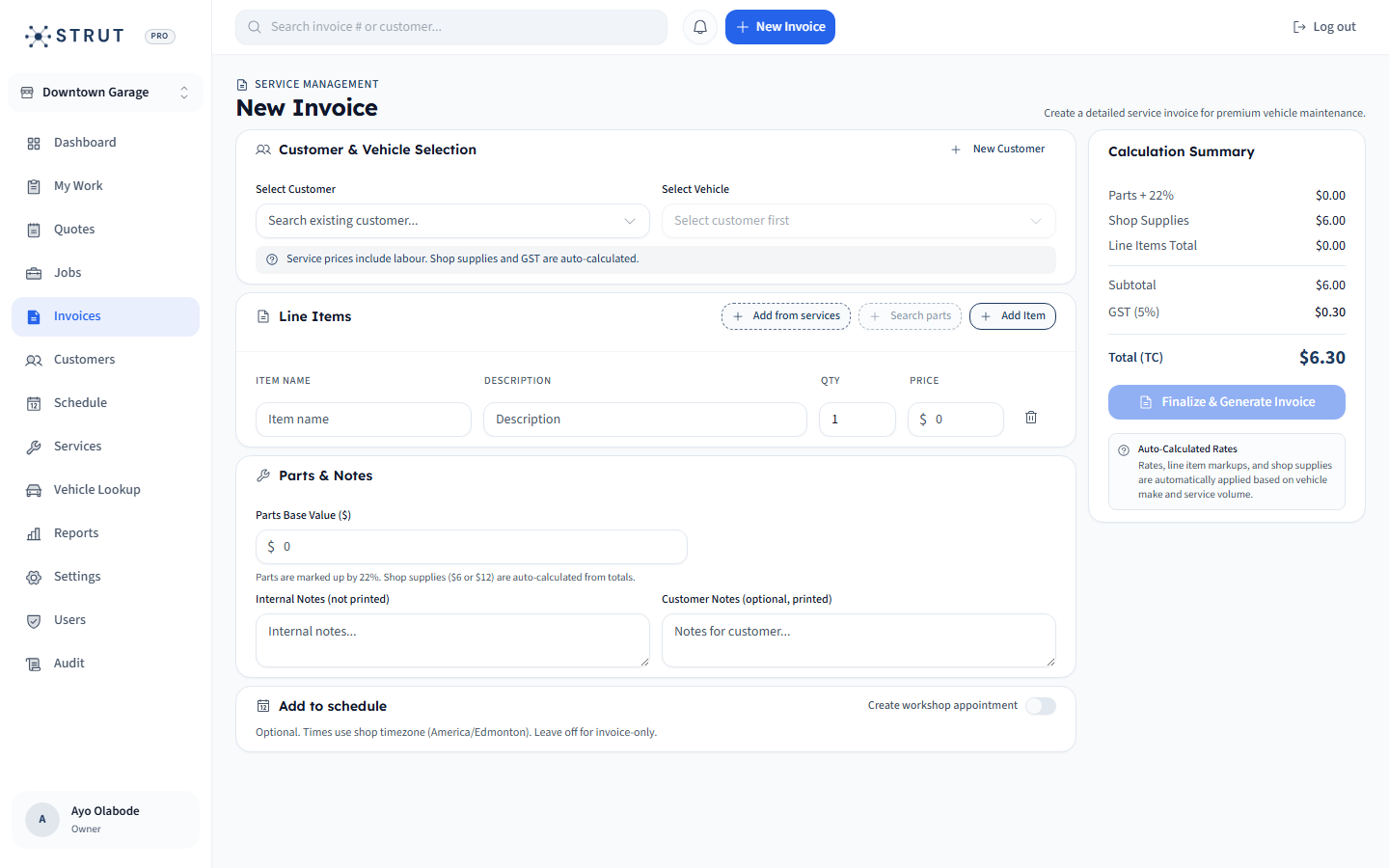
Strut invoice editor with customer, vehicle, service lines and tax preview
Existing public Strut screen: the invoice editor brings customer and vehicle selection together with itemized work and a total preview. Check your own tax setup during the demo.

Invoice preparation

Build an invoice the customer and advisor can explain

Start with the selected customer and vehicle, then review the service lines, labour, parts and supplies. Compare the final document with the agreed work before sending it. The existing public Strut invoice screen shows customer and vehicle selection, line items and the total preview; use those visible fields as a starting point for your own demo rather than assuming that every exception is automated.

  • Check quantities and rates before applying discounts and configured taxes.
  • Keep the estimate, authorized changes and completed work distinguishable.
  • Use the customer and vehicle record to avoid attaching a good invoice to the wrong visit.
Review a Canadian repair invoice before sendingCompare an estimate, repair order and invoice

Billing and collection

Keep billing follow-up separate from sending the invoice

A sent invoice, an unpaid balance and a settled payment describe different events. Strut’s public invoice detail provides PDF, printing and payment actions, and invoice emails support payment when Stripe is configured. Before contacting a customer, check the current invoice and payment record, including any partial payment or discrepancy. Confirm the recipient and assign one person to handle the next step.

  • Recheck the balance immediately before sending a payment request.
  • Resolve a disputed amount or payment mismatch before sending another reminder.
  • Confirm processing fees, settlement timing and accounting handoff separately from the software subscription.
See the online payment workflowUse the repair invoice payment follow-up checklist

Software selection

Test the billing exception that costs your shop time

Bring a changed repair scope, a partial payment or a returning customer with two vehicles to the demo. Ask the advisor to show the current document and explain the outstanding balance. If your group has two shops, check the issuing location as well. Strut includes invoicing in the published $49 CAD/month launch platform; confirm import scope, shop terms and any external accounting dependency before committing.

  • Write down what staff must do when the final work differs from the estimate.
  • Check who can see invoice details under each required staff role.
  • Compare the same example in your shortlisted products rather than comparing feature labels.
Compare invoicing software with a repair-specific demoCheck billing handoffs across repair-shop locations

Buying questions

Fast answers before a demo.

Short answers to the questions shop owners usually ask before they book a walkthrough.

How much does Strut Platform cost?

Strut Platform is $49 CAD/month for the full platform, including booking, scheduling, repair orders, invoices, payments, CRM, reporting, and multi-location controls.

Is Strut built for Canadian auto repair shops?

Yes. Strut is built in Calgary for Canadian repair shops and is priced in Canadian dollars. It is designed around appointment booking, shop capacity, repair orders, invoices, customer records, and payment collection.

Can Strut replace generic invoicing software?

For repair shops, yes. Strut handles invoicing as part of the full shop workflow, so customer, vehicle, repair, and payment context stay connected.

What is the difference between invoicing and billing software for an auto repair shop?

Invoicing creates and delivers the document showing the repair charges. Billing is the wider process of checking balances, recording payment status, resolving discrepancies and assigning follow-up. A repair shop should test both processes with the same customer, vehicle and repair example instead of assuming that sending an invoice completes collection.

What should a mechanic shop test before choosing invoice software?

Use a repair with parts, labour and a changed scope. Review the customer and vehicle, agreed work, quantities, discounts, tax setup and final document. Then test an unpaid or partially paid example and confirm the payment and accounting handoff. Ask the vendor to demonstrate exceptions instead of inferring them from screenshots.